
WooCommerce Layaway Plugin.
Own Your Program. Control the Terms.
Add a flexible WooCommerce layaway and bill pay system directly
to your store. Set your own down payment, expiration date and
payment terms, create customer invoices, and let customers make
payments through your WooCommerce website.
Invoice & bill pay
Flexible payment terms
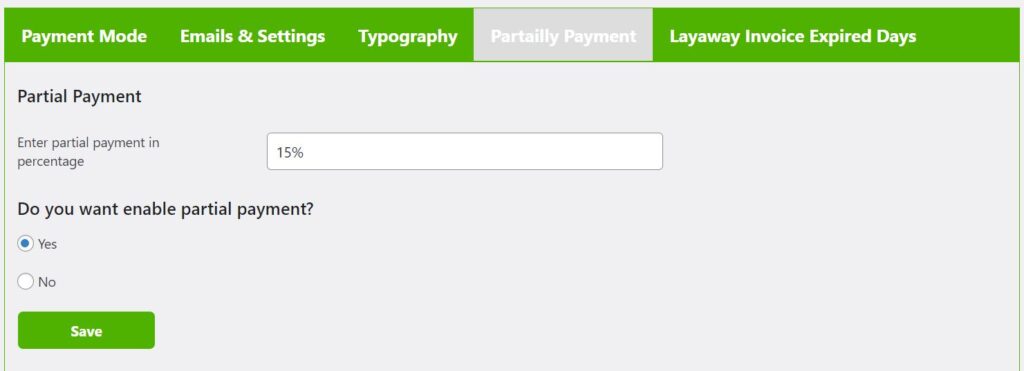
Your store. Your terms.
Control the amount due at checkout and how long your
customer has to pay the remaining balance.
More Than Just a WooCommerce Checkout Payment Option.
Use the WPLabWorks WooCommerce Layaway & Bill Pay Plugin for
online checkout, brick-and-mortar sales, service invoices or
virtually any customer balance you want paid through your
WooCommerce website.
Checkout Layaway
Add a WooCommerce layaway option directly to checkout.
Choose the percentage required up front and automatically
create the remaining layaway balance for the customer.
In-Store Layaway
Start a sale in your physical store, then create the remaining
balance from the WordPress backend so your customer can
continue making payments online.
Invoice & Bill Pay
Create a bill or customer invoice from the backend and send
an email directing the customer to your WooCommerce website
to make payment.
WooCommerce Layaway & Bill Pay
Give customers another way to purchase while keeping
control of the payment terms inside your business.
Use WPLabWorks as a WooCommerce layaway plugin,
flexible payment system, bill-pay solution or customer
invoice payment tool — all from WordPress.
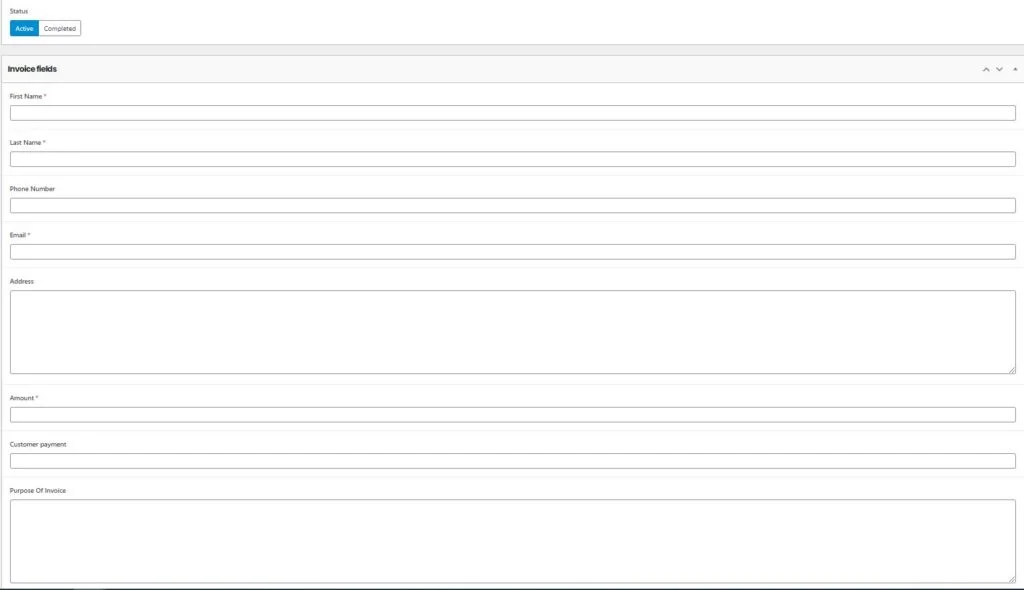
You Decide How Your Payment Program Works.
Stop forcing your business into someone else’s payment schedule.
Configure your WooCommerce layaway program around the way you
actually sell.
Custom Down Payment
Select the percentage customers must pay at WooCommerce
checkout when starting an automatic layaway.
Custom Expiration
Choose how long the customer has to complete payment instead
of forcing every sale into a preset installment schedule.
Flexible & Partial Payments
Customers can return to their WooCommerce account and make
additional partial payments toward the remaining balance.
Customer Emails
Provide customers with payment information and a direct path
back to your WooCommerce payment area.
Payment History
Keep track of payments already made, the remaining balance
and the expiration date for each layaway or invoice.
Manual Invoice Creation
Create layaways, customer invoices and bill-pay requests
directly from the WordPress administration area.
From WooCommerce Checkout to Paid in Full.
Your customer gets a straightforward layaway or invoice payment
experience while you maintain control from the WooCommerce side.
Customer Starts
The customer selects layaway during WooCommerce checkout,
or you manually create a layaway, bill or invoice from
the WordPress backend.
Payments Happen Online
The customer receives their payment information and can
access the balance through their WooCommerce customer account.
You Track the Balance
View payment history, remaining balance and expiration
information until the layaway or invoice has been paid in full.
Your Business Shouldn’t Have to Fit Someone Else’s Payment Plan.
WPLabWorks gives WooCommerce store owners the tools to run
a flexible layaway program around their own policies instead
of forcing every customer into the same fixed payment schedule.
Set the WooCommerce checkout percentage that makes
sense for your business.
Set your own expiration instead of using a fixed
four-payment schedule.
Ideal for in-store purchases, service work and
other offline sales.
Customers can access their balance through your
WooCommerce customer experience.
Keep track of what has been paid and what balance remains.
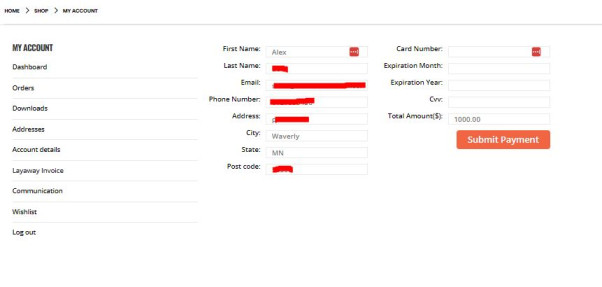
Customers Pay Without Learning Another Platform.
Customers receive their payment information and can return
to your WooCommerce website to view and pay their balance.
That keeps the payment experience connected to your store
instead of sending customers through an unfamiliar platform.
A Different Approach to WooCommerce Payment Plans.
WPLabWorks gives store owners another way to offer flexible
WooCommerce payment plans without forcing every customer
into the same preset installment schedule.
Use the plugin as an automatic WooCommerce layaway option
at checkout, manually create an in-store layaway, or send a
customer an invoice or bill-pay request. You choose the amount
required up front, the expiration date and the terms of your
program.
Customers can then return to their WooCommerce account to
make partial payments toward the balance while you keep track
of payment history and the amount remaining. That makes the
plugin useful for merchants searching for a WooCommerce
layaway plugin, partial payment solution, invoice payment
system or flexible bill-pay option.
Before You Install.
Quick answers about the WPLabWorks WooCommerce Layaway
& Bill Pay Plugin.
Can I choose my own WooCommerce layaway down payment?
start an automatic layaway during WooCommerce checkout.
Can I use the plugin for in-store layaway?
manually create the remaining balance so the customer
can continue making payments through your website.
Can I use it as a WooCommerce invoice payment plugin?
bill-pay requests without requiring the transaction
to originate from WooCommerce checkout.
Does the plugin support partial payments?
layaway or invoice balance through their WooCommerce
account until the balance is paid in full.
Does the WooCommerce layaway plugin track payments?
with the remaining balance and expiration information
for the layaway.
Do customers have to follow a fixed installment schedule?
program. Customers can make additional payments toward
their balance according to the program terms you establish.
Where does the customer make their payments?
your WooCommerce website and customer account experience.
Add Flexible WooCommerce Layaway to Your Store.
Set your terms. Accept partial payments. Send invoices.
Give customers another way to buy.